
How to Write a Resume (Examples, Template, & Tips)
To write a resume, start by choosing the right format, adding key sections like a summary, skills, and experience, and tailoring each application to the job. It’s no secret that today’s job market is full of challenges for job seekers. The rise of AI, ghost jobs, poor recruiting practices, and uncer

To write a resume, start by choosing the right format, adding key sections like a summary, skills, and experience, and tailoring each application to the job.
It’s no secret that today’s job market is full of challenges for job seekers. The rise of AI, ghost jobs, poor recruiting practices, and uncertainty about the future of work are real obstacles to navigate. But despite all these changes, one thing remains constant: A well-written resume is the key that opens doors to your future career.
This guide breaks down how to write a resume step by step, including what to include, how to structure each section, and how to tailor your resume so it stands out in any market.
Why Writing a Professional Resume Matters
A resume remains the primary document for job applications. Whether you’re getting referred, filling out an online application form, or handing out paper copies, a resume allows employers to view your skills, experience, and contact information in one place.
Creating a resume doesn’t have to be difficult. There are many tools and services available to help you write a professional resume, such as certified resume writers, resume builders, and even artificial intelligence (AI).
A word to the wise: While AI is easily accessible, it’s crucial to be cautious. AI may produce false, misleading, or repetitive content that recruiters can easily spot. If you want to make a strong first impression, always add your unique touch, no matter what tool or service you use.
How to Make a Resume Step-by-Step
Below, we’ll go into detail about how to write a resume and personalize each section to land the job you want.
Prefer video? Here’s a breakdown of the process.
Step 1:
Choose Your Ideal Resume Format
Not all resumes are alike, and depending on your experience level and career scenario, you’ll want to organize and format your resume sections in different ways.
There are three recruiter-approved layouts—or resume formats—that determine the order in which your sections appear on the page.
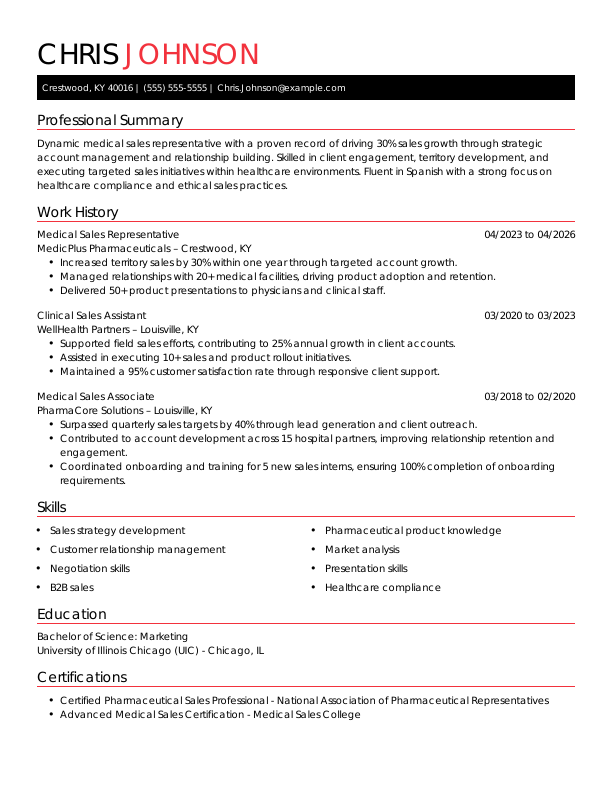
Chronological Resume Format
The most commonly used resume layout is the chronological format. It puts the focus on your work experience, which you organize in reverse-chronological order, hence the name.
The chronological resume is ideal for highly experienced candidates with 10 or more years of experience.
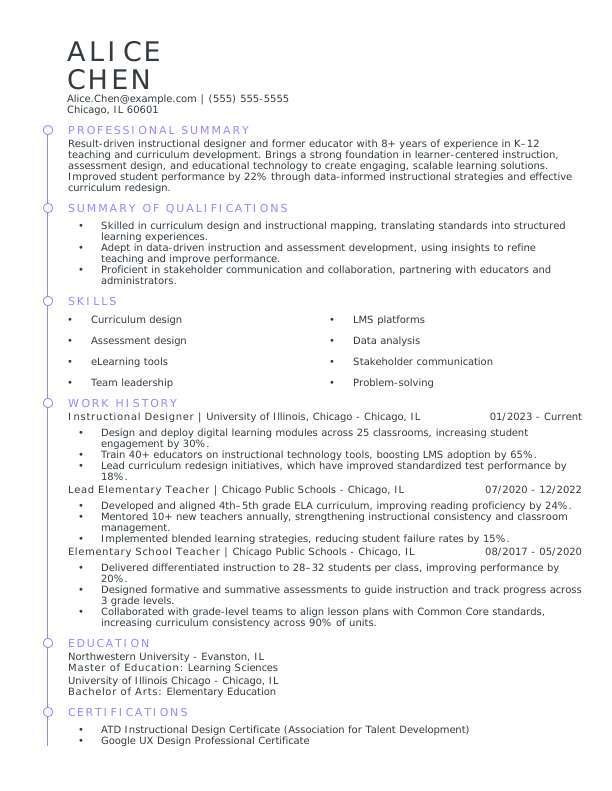
Combination Resume Format
The combination resume format is similar to the chronological resume, but it emphasizes skills over work experience. In a combination resume, the skills section is either next to or above the work history and often includes a summary of qualifications—a short list of bullet points that highlight your top skills, credentials, and achievements relevant to the target job.
This format is handy for career changers, recent graduates, or promotion seekers, as it allows you to showcase your most relevant abilities upfront while still providing a clear employment history.
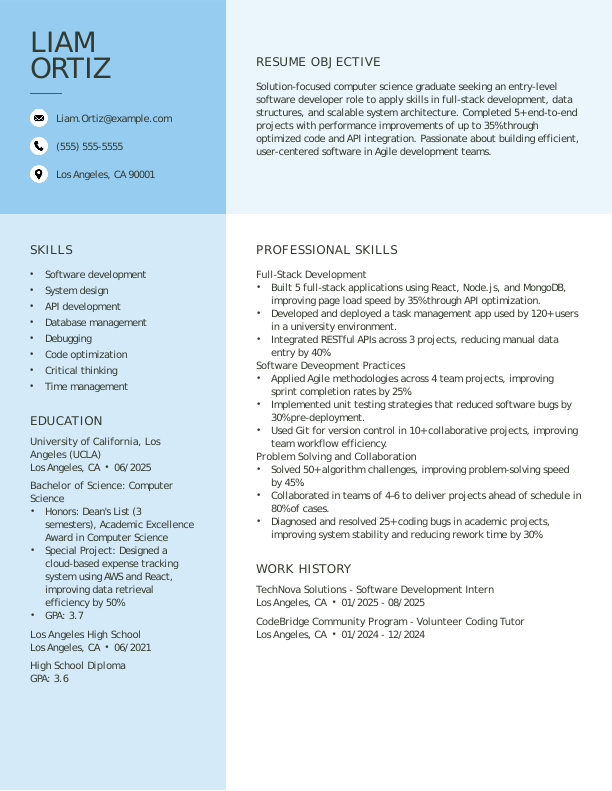
Functional Resume Format
The functional resume is ideal for candidates with limited work experience, such as students or first-time job seekers. Unlike the chronological format, which highlights job history, the functional resume emphasizes skills and achievements to show why you’re a strong candidate.
Functional resumes feature an expanded skills section divided into three or four core skills, each supported by bullet points showing how you’ve applied those skills in school projects, internships, volunteer work, or part-time jobs.
Step 2:
Add Your Contact Information
Your resume’s contact information section should be simple and straightforward. It should include:
Your full name so employers can identify you
Your phone number and email so employers can contact you
Your work location (city and state), so employers can determine if you’re eligible to fill the position
Keep the following in mind when writing your contact information:
Omit your full street address to prevent security issues.
Include a link to your portfolio or website if relevant for the job.
Feel free to add your LinkedIn profile to share more about yourself.
Resume contact information example:
Dorian Jefferson
Providence, RI | 555-555-5555 | Dorian.Jefferson@example.com | linkedin.com/dorian-jefferson
Step 3:
Share Top Qualifications in a Summary or Objective
Your resume should include a brief paragraph consisting of two to five sentences where you introduce yourself to employers and share your qualifications.
If you’ve been steadily employed for a few years, you can create a resume summary that emphasizes what you bring to the role. Learning how to write a resume summary effectively means sharing your years of experience, highlighting two to four relevant skills and any relevant credentials you may hold, and including at least one notable career achievement that sets you apart.
Resume summary example:
Professional Summary
Detail-oriented Accountant with 6 years of experience managing financial records, preparing accurate reports, and ensuring compliance with GAAP standards. Skilled in budgeting, forecasting, and process optimization to improve financial efficiency. Proficient in QuickBooks, Excel, and SAP, with a proven record of reducing reporting errors by 25% and streamlining month-end close processes to support data-driven business decisions.
If you’re a first-time job seeker or career changer, or you’re reentering the workforce, you might benefit more from using the resume objective approach. The resume objective still shares important details about your qualifications, but you can also briefly note your current career scenario and what you’re looking to accomplish. This strategy helps you counteract a lack of experience with a positive, goal-oriented approach.
Resume objective example:
Resume Objective
Results-driven sales professional with 5+ years of experience in client relations, campaign coordination, and cross-functional collaboration, seeking to transition into a marketing project manager role. Eager to apply proven skills in communication, strategic planning, and data analysis to manage projects that drive brand growth and customer engagement.
Step 4:
Outline Your Work Experience
Your resume’s work history section should give employers an overview of your career history. You’ll want to organize your jobs in reverse-chronological order, so employers see your most recent and relevant information first.
When employers are analyzing your work experience, they want to get a glimpse of what you achieved in each role. For each job you list, include three to four bullet points stating unique accomplishments and—better yet—any quantifiable results. Remember that employers think in terms of profit and efficiency, so adding numbers is a great way to capture their attention.
Every work history entry should include the following details:
Your official job title
The company name and location (city and state)
Employment dates (month and year)
A few bullet points describing accomplishments, not generic job duties
Resume work experience example:
Work Experience
Software Engineer
TechNova Solutions, San Francisco, CA | June 2021–PresentDesigned and implemented scalable RESTful APIs that improved data retrieval speed by 35%, enhancing overall app performance.
Led a cross-functional team of 4 developers in migrating a legacy system to microservices, reducing server downtime by 40%.
Collaborated with product managers to deploy new features using Agile methodologies, contributing to a 25% faster release cycle.
Junior Software Engineer
CodeCraft Innovations, San Jose, CA | July 2018–May 2021Developed and maintained front-end components using React and TypeScript, boosting user engagement by 20%.
Automated testing processes with Jest and Cypress, decreasing bug reports by 30% post-release.
Partnered with UX designers to improve accessibility and usability, earning positive feedback from client satisfaction surveys.
Step 5:
Curate Your Skills Section
Your resume should include a skills section listing six to eight of your most job-relevant skills in a simple bulleted list. The key to making a resume skills section that captures an employer’s eye is to carefully tailor it to the job you’re applying for.
Use your target role’s job advertisement for clues as to what the employer needs for the job. These could be a wide range of hard skills related to the role’s tasks, or soft skills that are necessary to be an effective team member, leader, or innovator, for example.
Skills section example:
Skills
Food preparation and cooking techniques (grilling, sautéing, roasting)
Knife skills and kitchen safety
Inventory management and ordering
Knowledge of food sanitation (ServSafe certified)
Team collaboration and communication
Adaptability under pressure
Problem-solving during service
Work ethic and reliability
Step 6:
Showcase Your Education
Your education section comes last on your resume, but it gives employers crucial information about whether you’re qualified for the role. Many job ads list basic educational requirements that every candidate must have to be considered for employment. Read this information carefully to identify those must-have credentials, and share the ones you possess in your resume.
A well-written education section doesn’t have to include a lot of details. Employers just need to know the title of your degree or diploma and the name and location of the school you attended. Avoid sharing graduation dates as these can give clues to your age and put you at risk of hiring bias. If you’re in the process of completing your studies, however, you should note this by stating your expected graduation date.
If you want to optimize your education section with information you feel is relevant to the job, you can definitely do so. For instance, here are a few accomplishments you can add to your resume’s education section:
Your GPA (if 3.4 or higher)
Honors and awards
Relevant coursework
Projects
Publications
Recent graduate resume education example:
Education
Bachelor of Science in Finance | Northeastern University
Boston, MA | May 2025GPA: 3.8
Honors & Awards: Dean’s List (2022–2025), Outstanding Finance Student Award 2024
Relevant Projects:
Investment Portfolio Analysis | 2024: Built and managed a simulated $100,000 equity portfolio, achieving a 12% annual return using financial modeling and risk analysis.
Corporate Valuation Project | 2025: Conducted valuation of a publicly traded company using DCF and comparable company analysis, presenting actionable investment recommendations to a panel of professors.
Step 7:
Consider Additional Resume Sections
Once you’ve completed the five essential resume sections—contact information, summary, work experience, skills, and education—you can consider additional resume sections to share more achievements.
Depending on your target role, you can consider a few of these optional sections:
Certifications
A certifications section is a great way to share details about required training and licenses for jobs like nurses, software developers, project managers, healthcare professionals, and teachers.
Resume certifications section example:
Certifications
Project Management Professional (PMP) | Project Management Institute | 2025
Agile Certified Practitioner (PMI-ACP) | Project Management Institute | 2025
Certified ScrumMaster (CSM) – Scrum Alliance | 2024
Lean Six Sigma Green Belt | International Association for Six Sigma Certification | 2024
Microsoft Project Specialist | Microsoft | 2023
Awards & Honors
If you’ve received any awards for your work or studies, adding a section to showcase these is a great way to legitimize your skills and experience.
In marketing and sales jobs, awards are especially prestigious, but even a general prize for excellent work demonstrates your professionalism.
Awards and honors section example:
Awards and Honors
Marketing Campaign of the Year | American Marketing Association | 2024
Top Performer Award | Thunder Digital Agency | 2023
Excellence in Content Marketing | Content Marketing Institute | 2022
Languages
Multilingualism is a valuable skill set for any industry. If you speak more than one language and you have leftover space in your resume, feel free to add a section for languages. Share which one is your native tongue and include your level of proficiency for others.
Languages section example:
Languages
English | Native
Spanish | Professional Working Proficiency
French | Conversational
German | Basic
Volunteer Work
Volunteer experience shows employers that you share their values and can contribute to the company culture, especially at organizations that prioritize community service.
Volunteer experience section example:
Volunteer Work
Community Outreach Volunteer
Helping Hands Nonprofit, New York, NY | January 2023–PresentOrganized monthly food drives, distributing meals to over 500 community members.
Coordinated a team of 10 volunteers, improving efficiency and event turnout by 30%.
Tutoring Volunteer
Local Youth Center, New York, NY | September 2021–December 2022Created interactive lesson plans to foster student engagement and learning.
Tutored 15+ students weekly in math and reading, improving average test scores by 20%.
How to Format Your Resume
A resume’s formatting is important for a couple of reasons: You want it to be polished and professional, and you need it to be optimized for hiring algorithms that scan your resume before it reaches a recruiter’s hands.
If you’re creating a resume from scratch, ensure it meets the following criteria:
Resume length: Keep your resume to one to two pages long so recruiters can skim it quickly.
Resume fonts and size: Opt for a professional resume font that’s easy to read, like Arial, Georgia, or Helvetica. A font size between 11 and 12 is best for the resume’s overall text, while a size between 14 and 16 works for section headings.
Margins: Keep 1-inch margins for a balanced layout with ample white space.
Line spacing: Use consistent spacing throughout your resume to ensure the text is easy to read. Line spacing of 1.15 to 1.5 is generally recommended.
Layout: Format your resume to be compliant with applicant tracking systems (ATS) by limiting or avoiding the use of complex designs like text boxes, images, or graphics.